
Create your vault
Choose your secret PIN: it protects access to your vault and contributes to encrypting your documents. You can also use your mobile’s fingerprint or face recognition.
Your mobile document vault. Maximum-level security right in your pocket: 100% free, serverless and tracking-free. Your files never leave your phone.
Local AES-256-GCM encryption
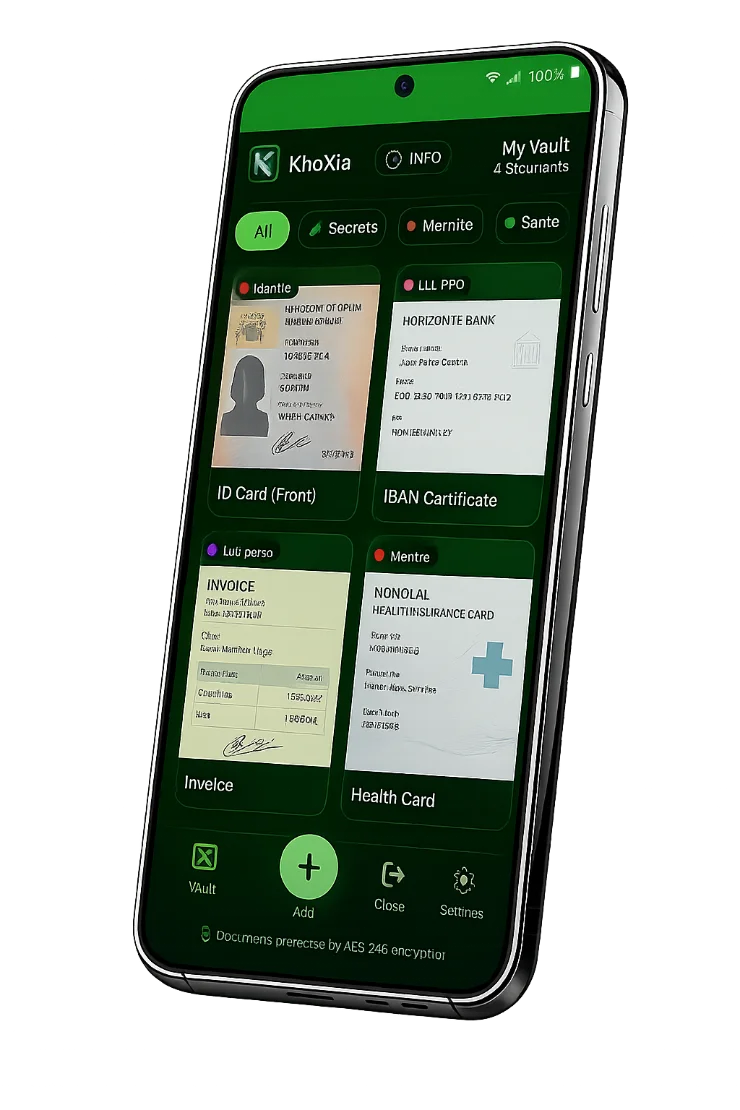
Keep your important, official or confidential documents, photos and information in a protected space on your mobile.
Choose your secret PIN: it protects access to your vault and contributes to encrypting your documents. You can also use your mobile’s fingerprint or face recognition.
Scan them with your camera or import them from your photos and documents. KnoXia keeps the encrypted copy in your vault; remember to permanently delete the original if needed.
Create your own categories, organise your documents and assign several categories to one file to find what matters in an instant.
The dedicated “Secrets” category protects sensitive text information: PINs, access codes, safe combinations or alarm codes.
Send a decrypted document by email or SMS when needed. After sharing, its copy remains encrypted in your vault: choose your recipients carefully.
No complex setup. Encryption happens on your device before anything is stored.
Every document is encrypted with AES-256-GCM directly on your phone. The key is derived from your secret phrase using PBKDF2.
Your files remain in a local vault whose combination only you know. Without your secret PIN, the data is unreadable, even if the device is stolen.
View your documents anywhere, even offline. Your vault remains available directly on your mobile, with no server and no account.
KnoXia protects your documents directly on your mobile, with no account, server, ads or subscription.
0 €forever
A personal vault for your documents, photos and confidential information, stored locally on your mobile.
We use proven standards relied on by organisations and companies with the most demanding privacy and security requirements.
Here is what specifically protects your files:
The benchmark symmetric encryption. The GCM variant guarantees both confidentiality and integrity: an encrypted file cannot be altered without detection.
Your secret phrase is turned into an encryption key through hundreds of thousands of iterations (600,000). A brute-force attack becomes extremely costly.
Your keys never leave your device. KnoXia does not send your documents to a server and cannot read them.
Content is encrypted and decrypted only on your mobile. No intermediary can access it.
Open, documented standards, with no opaque proprietary mechanism. Trust is built on transparency, not promises.
Yes, 100%. Local encryption requires neither a server nor an account. No ads, no file limit.
Your data remains only on your device. If your phone is lost or replaced, it cannot be recovered from a server, but it remains unreadable to anyone else without your PIN.
No. A zero-knowledge architecture means that even KnoXia cannot access your encrypted data. The keys stay with you.
AES-256-GCM is high-grade encryption used by official organisations and financial companies to protect sensitive data.
Start protecting your documents today. KnoXia is free, with no subscription, forever.
The KnoXia app is available only as a Progressive Web App. Install it on your phone’s home screen and it works just like a native mobile app, without the drawbacks. You will find KnoXia in your list of installed apps and manage it in exactly the same way. Open KnoXia by tapping its icon on your screen.
By choosing the PWA format, KnoXia gives you complete independence from traditional app stores, real-time app updates and fully offline operation.
Open KnoXia in Chrome, tap the ⋮ menu, then choose “Install app” or “Add to Home screen”.
Open KnoXia in Safari, tap Share , then choose “Add to Home Screen” and “Add”.
